What is it?
Developing or modifying a Progress application involves more than just modifying code – it is a team effort, where many people and procedures are required, from bug reporting, through analysis, programming, testing, and installing.  You need more than just a source control system – you need a tool that manages the workflow and communication for the whole process.  And that’s why OSCAR was written.  Besides providing strong reliable source control, it also manages the workflow, passing tasks from each participant to the next.

In OSCAR, all work is broken into tasks, which represent a manageable portion of a change requirement.  Affected programs and other files are attached to the task, and move with it as it is passed from one person to the next, for instance from the programmer to the tester.

What's in it for me?


Manager

OSCAR automates and formalises the communication and workflow requirements of the software development life cycle.  By using an automated tool like OSCAR instead of relying on manual procedures, procedures won’t be forgotten or bypassed.  For instance a tester can be automatically informed immediately that the programmer has finished changing a program.

Use OSCAR’s management browse functions to identify what work is being done, and to identify bottlenecks in your workflow.

You can define workflows of differing complexity to better mange the variety of jobs you need to do.  For instance, the workflow for new software development is usually different to that for a quick-response data patch program.


System Administrator

OSCAR, like other Overlink products, requires little if anything in the way of ongoing administration.  Once it has been installed and configured, you just use it.

The underlying XPRO security system makes access permissions easy to manage.


Users

Who are the “users” in OSCAR?  The programmers, testers, tech support people, and managers.  OSCAR uses the clear, consistent XPRO user interface, supported by XPRO menus and security.


Operations

Because your source code is solidly locked up, no changes to your live (production) environment can occur without going through your Quality Assurance workflow.

Accepted changes are batched for installation into the live environment at a time that suits your operations.


Tech Support

When you encounter a bug or change requirement, it’s an easy process to record this in OSCAR, ready for an analyst or programmer to pick up.

You can monitor the progress of the task through the workflow – whether it’s being worked on, or is in QA, or when it is scheduled to be released.


Programmers

You don’t have to concern yourself with moving modified programs around the system – to the Submit or Test directories etc., or checking that you’ve modifying the right copy, because OSCAR handles all this for you.

OSCAR’s unlimited-level version control means you can quickly identify what changes were made to a file, and when they were installed.

Never again will you have to redo your changes because of another programmer changing the same program.  And you don’t have to worry about overwriting the wrong copy of a program, because with OSCAR’s security you just can’t!

What does it run on?
XJOB runs on all Unix character platforms.

What do I get?
OSCAR is provided as either an encrypted-source runtime system licensed for a specified user count (multiples of 10), or can be purchased with full source code.  Overlink installs the software, configures it for one of your development applications, and provides documentation and training.

Whom do I contact?
Call Michael Lemaire on +61 411 724 297, or via email at michael@overlink.com.au.

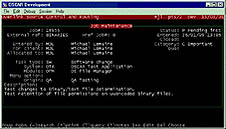
SCREEN SHOTS
.
SCREEN SHOT #01
SCREEN SHOT #02
SCREEN SHOT #03
SCREEN SHOT #04
SCREEN SHOT #05
SCREEN SHOT #06
SCREEN SHOT #07